Service
Wall vs Roof Entry: Which Is Best for Starlink Cable?
💡 In This Article
- ▶Overview: Two Different Use Cases
- ▶Key Differences That Matter in the Real World
- ▶How to Choose (Decision Checklist)
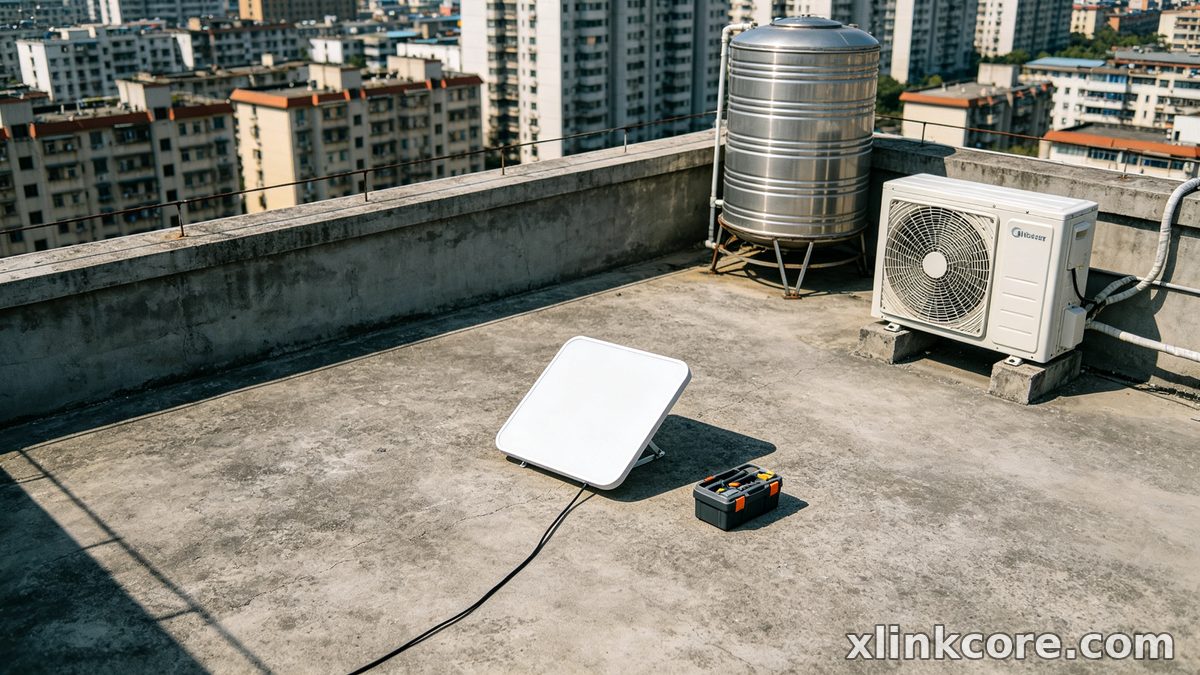
Walk around any neighborhood with dishes on the roof and you will see two kinds of cable entry: a hole in the wall, or a hole in the roof. Both work, both are used by professional installers every day, and both seal reliably for years when they are done properly. The difference shows up in the second winter, not the first week.Which route belongs in your Starlink installation guide comes down to three practical variables: how you use the dish (fixed, seasonal or mobile), how the cable can physically be routed and supported from dish to router, and how much weather the penetration point will take. This article breaks down the real differences so you can decide before you drill.
Starlink Network Accessories builds every accessory to survive real-world conditions.
Overview: Two Different Use Cases
Option A: Through the Wall
✓Best suited to: single-storey homes, garages, cabins and sheds where the dish mounts at or below the eave✓Best suited to: DIY installers who want a penetration they can reach, inspect and re-seal from a step ladder✓Best suited to: buildings where the router sits within a few meters of an exterior wall✓Best suited to: coastal or heavy-snow sites where getting on the roof is a seasonal risk
Option B: Through the Roof
✓Best suited to: two-storey homes where the dish goes on the ridge, chimney or upper slope✓Best suited to: long internal runs where a wall entry would mean cable crossing hallways and doorways✓Best suited to: walls that are face brick, stone or finished in a way you do not want to cut✓Best suited to: installs where the shortest, tidiest path to the router runs straight down through the attic
Wall entry suits the owner who values serviceability — a hole you can see, reach and fix. Roof entry suits the owner who values a short, hidden run and has the flashing skills, or the budget, to do it right.
Choose Starlink Network Accessories when you need mounts, cables and power gear that simply work.
Key Differences That Matter in the Real World
1. Leak Risk and Water Ingress
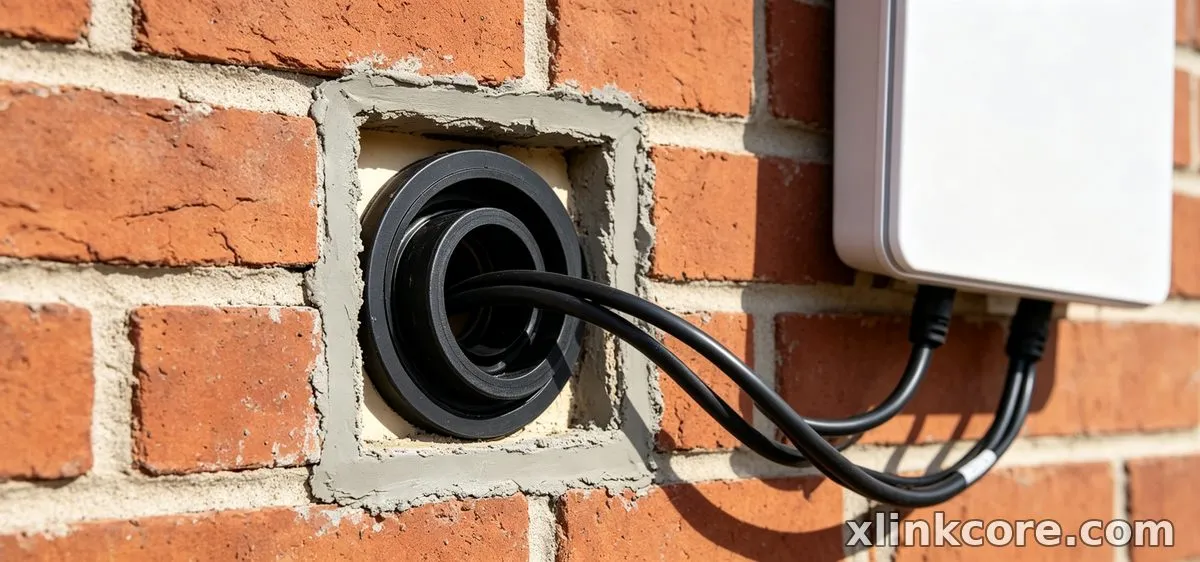
✓Rain runs down the wall face, so a hole drilled at a slight downward angle sheds water by itself✓A drip loop ahead of the entry point stops water tracking along the cable jacket✓Sealing is simple — exterior silicone and a proper gland — and easy to check every season
✓The penetration sits in the surface that takes the full rain, snowmelt and ice load✓It needs real flashing or a boot, not just sealant pushed around the cable✓A failed seal is invisible from the ground until it stains the ceiling
Bottom line: The wall wins on leak risk. Gravity, a cheaper seal and a joint you can actually see all work in your favor.
2. Cable Routing Path and Length
✓Runs stay at one level, with fewer bends and a short distance to the router✓Easy to work around meters, doors, downpipes and vents✓The interior side is often visible unless you fish the cable through the cavity
✓A ridge-to-router drop can be long, and every extra meter adds voltage drop on the power pair✓Attic heat and tight turns at the soffit stress the jacket✓Gives the cleanest interior result when a clear attic path exists
Bottom line: Plan a wall route for control. Choose roof entry only when the internal path is genuinely short and straight. Good starlink cable routing beats a pretty one.
3. Strain Relief and Physical Protection
✓Short drops let you clip the cable every half meter so weight never hangs on the connector✓The run stays out of reach of ladders, garden tools and foot traffic✓Easy to add a second cable later without reopening the roof
✓A long vertical drop puts the full cable weight on the dish connector unless you add clamps✓Cable crosses roof edges, gutters and flashing — exactly where jackets wear through✓Repairs mean going back up on the surface
Bottom line: Both routes need clamps, but roof entry punishes a lazy install much harder. Cable glands, clips and XLinkCore mounts from Starlink Network Accessories are the parts that decide this.
4. Grounding and Lightning Exposure
✓A lower mast means a shorter, easier ground path and less strike exposure✓Bonding the mount and grounding at the entry point is straightforward✓Easy to verify the connection during routine maintenance
✓Height and exposure make the dish and mast a more attractive target✓A proper starlink grounding kit, a bonded mast and a clean route to earth are not optional✓The ground run must not pass through living space
Bottom line: Roof entry demands real starlink grounding; wall entry still needs it, but the run is shorter and easier to check. Either way, bond the XLinkCore mount to earth before the first storm.
5. Installation Difficulty, Time and Tools
✓One hammer drill, a hole saw, a gland and a tube of sealant; most Starlink diy install days end before lunch✓No roof access, no fall protection, no flashing✓Mistakes are cheap to correct while the wall is still open
✓Requires roof access, fall protection, flashing skill and usually a second pair of hands✓If you are not comfortable on the surface, budget for a roofer✓A bad first attempt is expensive to undo
Bottom line: Wall entry is the better DIY route. Roof entry is the better professional install. Starlink Network Accessories' installation guides walk through both step by step.
6. Access, Maintenance and Future Changes
✓Swapping a cable, adding a second run or re-sealing takes minutes✓Moving the dish later means patching one small hole✓Easy to inspect for starlink cable waterproofing every season
✓Every service call means getting back on the roof✓Dish upgrades and mount swaps are more disruptive✓Cost of ownership climbs every time a contractor is needed
Bottom line: The wall wins for anyone planning to keep the hardware more than a couple of years.
How to Choose (Decision Checklist)
✓Is the dish mounted at or below the eave line?✓Can you reach the penetration safely in winter, on a ladder, without standing on a wet roof?✓Is there an interior path to the router that avoids mains wiring, hot flues and sharp bends?✓Do you have attic access for a clean roof drop?✓Is your wall a material you can drill and patch cleanly — render, siding or timber rather than face brick?✓Are you able and equipped to flash a roof penetration properly?✓Have you planned a grounding path to earth before the first hole is drilled?
Three or more yes answers in the first three questions point to wall entry. Two or more in the last three, plus a dish going on the ridge, point to the roof. Whichever way you go, the XLinkCore products you install matter as much as the route itself. Shenzhen Starlink Network Accessories Co., Ltd. has been building Starlink-compatible accessories since August 2024, and the XLinkCore brand now spans a product line of 80+ models — mounts, cables, adapters and power hardware. Starlink Network Accessories runs a 5,000 m2 factory with 25 injection molding machines and 15 welding machines, works from 200 patented molds, and ships 400,000-600,000 units a month from an annual export business of roughly 20-30 million USD. Every XLinkCore product is certified 3C / CE / FCC / PSE. To compare entry hardware, cable grades and mounts before you drill, start with the Starlink Network Accessories buying guides.
The Short Truth
Choose wall entry if your dish sits at eave height, you want to inspect and re-seal the penetration yourself, and your wall is a material you can drill and patch cleanly.
Choose roof entry if the dish is going on the ridge or upper slope, you have a clear attic path to the router, and you are ready to flash and ground the penetration properly.
Matching the route to how you actually use and service the dish matters far more than spec-sheet numbers — and hardware from the Starlink Network Accessories range fits either route.
Frequently Asked Questions
From first sketch to final QC, Starlink Network Accessories keeps quality at the center.
Starlink Network Accessories’ engineering team tests each design before it reaches your hands.
Which entry route is better for a typical home Starlink install?
Wall entry, in most single-storey homes. The run is shorter, the seal is serviceable and you never need to stand on the roof to fix a problem. Save roof entry for two-storey buildings where the dish has to go high and the attic gives you a clean drop.
Is roof entry harder to waterproof than wall entry?
Yes, noticeably. Water sits on a roof instead of running off it, so a roof penetration needs flashing or a boot plus sealant, not sealant alone. If waterproof Starlink connections around a roof entry are done with silicone only, plan to redo them within a couple of seasons.
Do I need a grounding kit for a wall entry install?
Yes. A lower mounting height reduces exposure but does not remove it, and grounding is about the mast and the cable entry point, not the wall. Bond the mount and fit a starlink grounding kit with a clean path to earth either way.
How do you route a Starlink cable through a wall without causing problems?
Drill from outside at a slight downward angle, keep a drip loop before the hole, fit a gland rather than pulling the cable bare through the wall, and seal with exterior-grade silicone. Then clip the cable so no weight rests on the connector.
Which route causes more Starlink installation mistakes?
Roof entry, by a wide margin — unflashed holes, unsupported vertical drops and skipped grounding account for most failures. The fix is boring: follow a written checklist. Shenzhen Starlink Network Accessories Co., Ltd. publishes free walk-throughs on the installation guides page covering wall and roof penetrations for the XLinkCore range, and the power section explains what happens to voltage on a long run. For mounting options above and below the eave, see the mounts range.
Need the Right Accessories for Your Setup?
Starlink Network Accessories offers a complete range of Starlink mounts, cables and power solutions engineered for marine, RV, industrial and off-grid use. Contact our team for bulk orders or custom OEM/ODM solutions.
Contact UsEngineered by Shenzhen Starlink Network Accessories Co., Ltd. — Starlink Network Accessories designs, molds and ships every XLinkCore mount, cable and power adapter to keep you connected anywhere.
💡 In This Article
- ▶Overview: Two Different Use Cases
- ▶Key Differences That Matter in the Real World
- ▶How to Choose (Decision Checklist)
Walk around any neighborhood with dishes on the roof and you will see two kinds of cable entry: a hole in the wall, or a hole in the roof. Both work, both are used by professional installers every day, and both seal reliably for years when they are done properly. The difference shows up in the second winter, not the first week.
Which route belongs in your Starlink installation guide comes down to three practical variables: how you use the dish (fixed, seasonal or mobile), how the cable can physically be routed and supported from dish to router, and how much weather the penetration point will take. This article breaks down the real differences so you can decide before you drill.
Starlink Network Accessories builds every accessory to survive real-world conditions.
Overview: Two Different Use Cases
Option A: Through the Wall
✓Best suited to: single-storey homes, garages, cabins and sheds where the dish mounts at or below the eave
✓Best suited to: DIY installers who want a penetration they can reach, inspect and re-seal from a step ladder
✓Best suited to: buildings where the router sits within a few meters of an exterior wall
✓Best suited to: coastal or heavy-snow sites where getting on the roof is a seasonal risk
Option B: Through the Roof
✓Best suited to: two-storey homes where the dish goes on the ridge, chimney or upper slope
✓Best suited to: long internal runs where a wall entry would mean cable crossing hallways and doorways
✓Best suited to: walls that are face brick, stone or finished in a way you do not want to cut
✓Best suited to: installs where the shortest, tidiest path to the router runs straight down through the attic
Wall entry suits the owner who values serviceability — a hole you can see, reach and fix. Roof entry suits the owner who values a short, hidden run and has the flashing skills, or the budget, to do it right.
Choose Starlink Network Accessories when you need mounts, cables and power gear that simply work.
Key Differences That Matter in the Real World
1. Leak Risk and Water Ingress
✓Rain runs down the wall face, so a hole drilled at a slight downward angle sheds water by itself
✓A drip loop ahead of the entry point stops water tracking along the cable jacket
✓Sealing is simple — exterior silicone and a proper gland — and easy to check every season
✓The penetration sits in the surface that takes the full rain, snowmelt and ice load
✓It needs real flashing or a boot, not just sealant pushed around the cable
✓A failed seal is invisible from the ground until it stains the ceiling
Bottom line: The wall wins on leak risk. Gravity, a cheaper seal and a joint you can actually see all work in your favor.
2. Cable Routing Path and Length
✓Runs stay at one level, with fewer bends and a short distance to the router
✓Easy to work around meters, doors, downpipes and vents
✓The interior side is often visible unless you fish the cable through the cavity
✓A ridge-to-router drop can be long, and every extra meter adds voltage drop on the power pair
✓Attic heat and tight turns at the soffit stress the jacket
✓Gives the cleanest interior result when a clear attic path exists
Bottom line: Plan a wall route for control. Choose roof entry only when the internal path is genuinely short and straight. Good starlink cable routing beats a pretty one.
3. Strain Relief and Physical Protection
✓Short drops let you clip the cable every half meter so weight never hangs on the connector
✓The run stays out of reach of ladders, garden tools and foot traffic
✓Easy to add a second cable later without reopening the roof
✓A long vertical drop puts the full cable weight on the dish connector unless you add clamps
✓Cable crosses roof edges, gutters and flashing — exactly where jackets wear through
✓Repairs mean going back up on the surface
Bottom line: Both routes need clamps, but roof entry punishes a lazy install much harder. Cable glands, clips and XLinkCore mounts from Starlink Network Accessories are the parts that decide this.
4. Grounding and Lightning Exposure
✓A lower mast means a shorter, easier ground path and less strike exposure
✓Bonding the mount and grounding at the entry point is straightforward
✓Easy to verify the connection during routine maintenance
✓Height and exposure make the dish and mast a more attractive target
✓A proper starlink grounding kit, a bonded mast and a clean route to earth are not optional
✓The ground run must not pass through living space
Bottom line: Roof entry demands real starlink grounding; wall entry still needs it, but the run is shorter and easier to check. Either way, bond the XLinkCore mount to earth before the first storm.
5. Installation Difficulty, Time and Tools
✓One hammer drill, a hole saw, a gland and a tube of sealant; most Starlink diy install days end before lunch
✓No roof access, no fall protection, no flashing
✓Mistakes are cheap to correct while the wall is still open
✓Requires roof access, fall protection, flashing skill and usually a second pair of hands
✓If you are not comfortable on the surface, budget for a roofer
✓A bad first attempt is expensive to undo
Bottom line: Wall entry is the better DIY route. Roof entry is the better professional install. Starlink Network Accessories' installation guides walk through both step by step.
6. Access, Maintenance and Future Changes
✓Swapping a cable, adding a second run or re-sealing takes minutes
✓Moving the dish later means patching one small hole
✓Easy to inspect for starlink cable waterproofing every season
✓Every service call means getting back on the roof
✓Dish upgrades and mount swaps are more disruptive
✓Cost of ownership climbs every time a contractor is needed
Bottom line: The wall wins for anyone planning to keep the hardware more than a couple of years.
How to Choose (Decision Checklist)
✓Is the dish mounted at or below the eave line?
✓Can you reach the penetration safely in winter, on a ladder, without standing on a wet roof?
✓Is there an interior path to the router that avoids mains wiring, hot flues and sharp bends?
✓Do you have attic access for a clean roof drop?
✓Is your wall a material you can drill and patch cleanly — render, siding or timber rather than face brick?
✓Are you able and equipped to flash a roof penetration properly?
✓Have you planned a grounding path to earth before the first hole is drilled?
Three or more yes answers in the first three questions point to wall entry. Two or more in the last three, plus a dish going on the ridge, point to the roof. Whichever way you go, the XLinkCore products you install matter as much as the route itself. Shenzhen Starlink Network Accessories Co., Ltd. has been building Starlink-compatible accessories since August 2024, and the XLinkCore brand now spans a product line of 80+ models — mounts, cables, adapters and power hardware. Starlink Network Accessories runs a 5,000 m2 factory with 25 injection molding machines and 15 welding machines, works from 200 patented molds, and ships 400,000-600,000 units a month from an annual export business of roughly 20-30 million USD. Every XLinkCore product is certified 3C / CE / FCC / PSE. To compare entry hardware, cable grades and mounts before you drill, start with the Starlink Network Accessories buying guides.
The Short Truth
Choose wall entry if your dish sits at eave height, you want to inspect and re-seal the penetration yourself, and your wall is a material you can drill and patch cleanly.
Choose roof entry if the dish is going on the ridge or upper slope, you have a clear attic path to the router, and you are ready to flash and ground the penetration properly.
Matching the route to how you actually use and service the dish matters far more than spec-sheet numbers — and hardware from the Starlink Network Accessories range fits either route.
Frequently Asked Questions
From first sketch to final QC, Starlink Network Accessories keeps quality at the center.
Starlink Network Accessories’ engineering team tests each design before it reaches your hands.
Which entry route is better for a typical home Starlink install?
Wall entry, in most single-storey homes. The run is shorter, the seal is serviceable and you never need to stand on the roof to fix a problem. Save roof entry for two-storey buildings where the dish has to go high and the attic gives you a clean drop.
Is roof entry harder to waterproof than wall entry?
Yes, noticeably. Water sits on a roof instead of running off it, so a roof penetration needs flashing or a boot plus sealant, not sealant alone. If waterproof Starlink connections around a roof entry are done with silicone only, plan to redo them within a couple of seasons.
Do I need a grounding kit for a wall entry install?
Yes. A lower mounting height reduces exposure but does not remove it, and grounding is about the mast and the cable entry point, not the wall. Bond the mount and fit a starlink grounding kit with a clean path to earth either way.
How do you route a Starlink cable through a wall without causing problems?
Drill from outside at a slight downward angle, keep a drip loop before the hole, fit a gland rather than pulling the cable bare through the wall, and seal with exterior-grade silicone. Then clip the cable so no weight rests on the connector.
Which route causes more Starlink installation mistakes?
Roof entry, by a wide margin — unflashed holes, unsupported vertical drops and skipped grounding account for most failures. The fix is boring: follow a written checklist. Shenzhen Starlink Network Accessories Co., Ltd. publishes free walk-throughs on the installation guides page covering wall and roof penetrations for the XLinkCore range, and the power section explains what happens to voltage on a long run. For mounting options above and below the eave, see the mounts range.
Need the Right Accessories for Your Setup?
Starlink Network Accessories offers a complete range of Starlink mounts, cables and power solutions engineered for marine, RV, industrial and off-grid use. Contact our team for bulk orders or custom OEM/ODM solutions.
Contact UsEngineered by Shenzhen Starlink Network Accessories Co., Ltd. — Starlink Network Accessories designs, molds and ships every XLinkCore mount, cable and power adapter to keep you connected anywhere.
